
How do I add or edit my brand's information?
Where to edit your brand profile, invoicing details and Brand Kit.
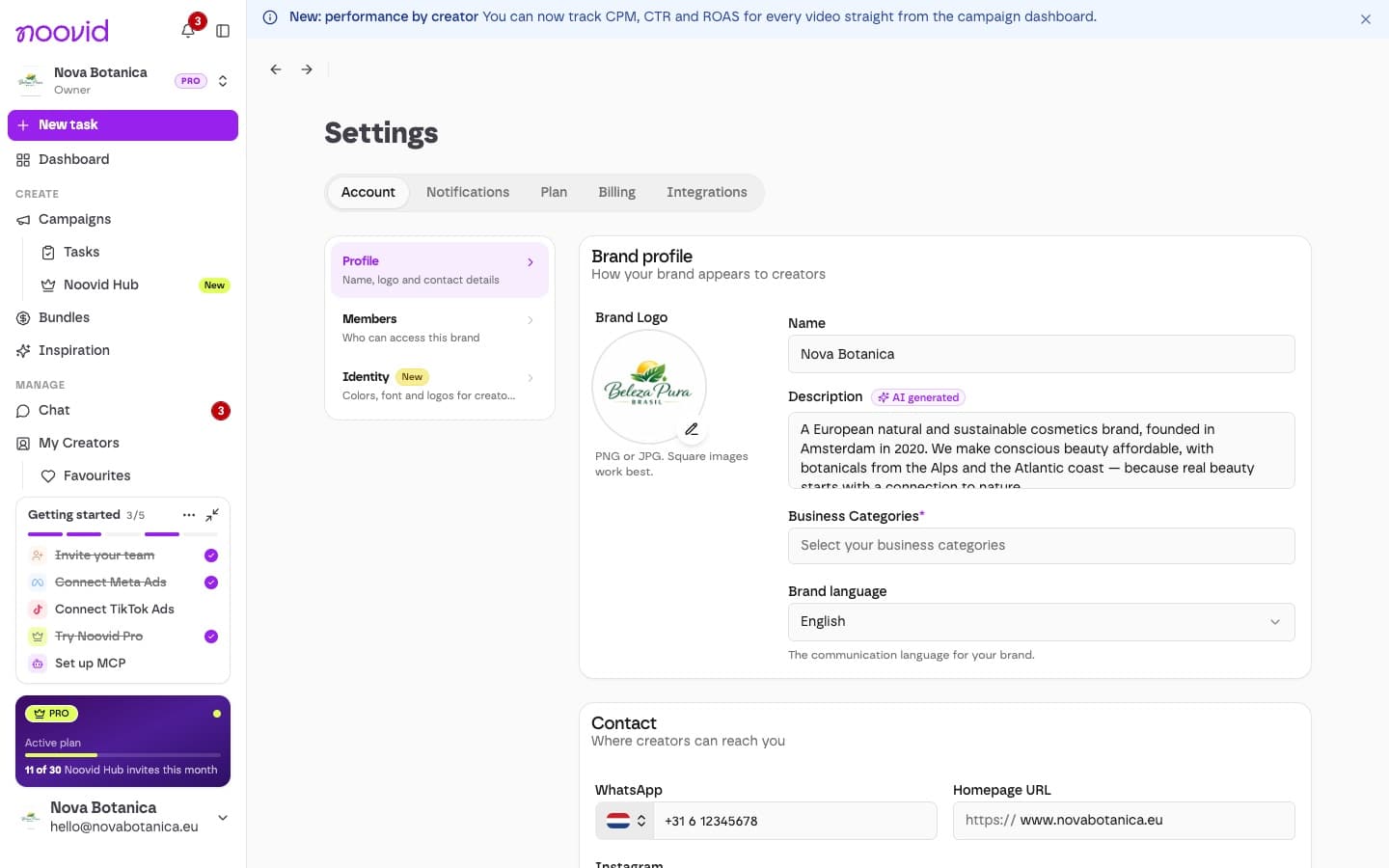
You can edit your brand's details any time under Settings → Account → Profile. A complete profile helps creators get your brand — and makes them more likely to apply.
✏️ How to do it
Open your profile
Go to Settings → Account → Profile.
Update your details
Change anything you need, such as:
- Brand profile: logo, name, description, business categories and brand language
- Contact: WhatsApp, website and Instagram
- Invoicing details, including your VAT number and business address
Save
Click Save in the bar at the bottom of the page (or Discard to undo your changes).
Who can edit it?
Only Admins and the Owner can edit the brand's information. Team roles
🎨 Your Brand Kit
Under Settings → Account → Identity, you can also set your colours, font, logos, caption style and brand voice — creators see them on every project. Setting up your Brand Kit
🔐 What can't be changed?
Your market (Europe or Brasil) and the country where your brand is based are fixed after sign-up. If you need to change them, message our support team.
Keeping your profile complete and up to date helps creators trust you and makes your projects run better.