
👤 Account & team
What is the Brand Kit and how do I set it up?
Set your colours, font, logos, caption style and brand voice once, and creators see them on every project.
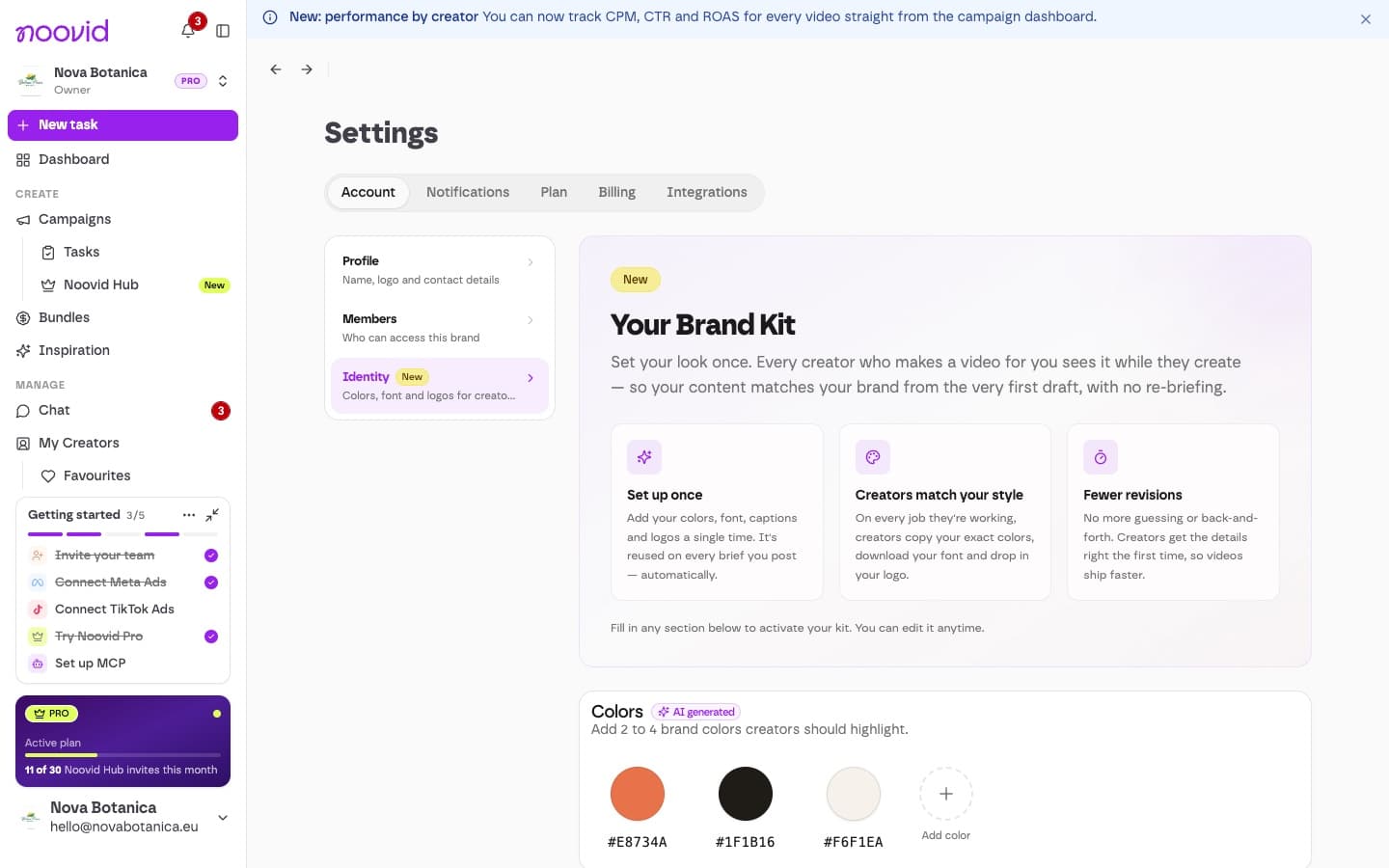
The Brand Kit is where you tell creators how your brand looks and sounds — once, so you don't have to repeat it in every brief. Creators see it on every project they do for you.
📍 Where to find it
Go to Settings → Account → Identity ("Your Brand Kit").
🎨 What you can add
| Item | What to add |
|---|---|
| Colors | 2 to 4 brand colours |
| Font | Your brand font (.ttf or .otf) for captions and on-screen text |
| Caption style | How you'd like subtitles and on-screen text to look |
| Logos | Light (for dark backgrounds), Dark (for light backgrounds) and Icon (a square mark) versions |
| Brand voice & guidelines | Your tone, do's and don'ts and anything else creators should know — for example, "friendly and direct, no slang" |
✨ We pre-fill it from your website
When you sign up, Noovid reads your website and fills in what it can.
Give it a quick check
These fields are tagged AI generated — give them a quick check and edit anything that isn't quite right.