
📦 Products & shipping
Where do I find the creator's address?
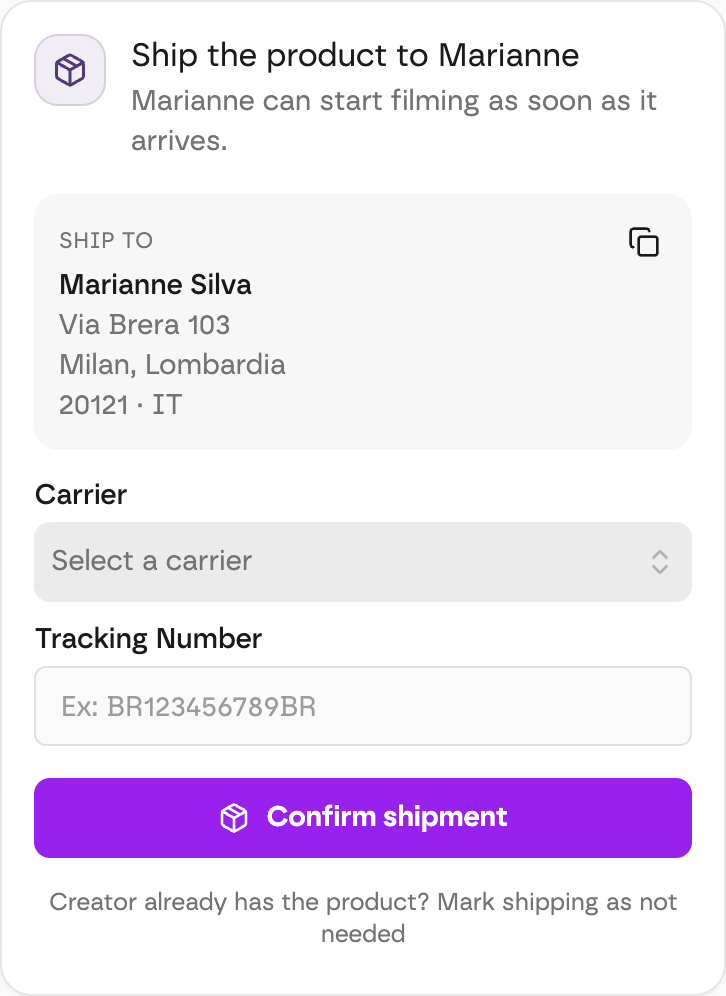
The creator's address is on their job page, in the Ship to box — with a copy button for your shipping label.
On the creator's job page, in the Ship to box. It's there as soon as you accept the creator.
- Before you ship: the Ship the product to (creator name) card shows the address at the top. Click the copy icon to paste it onto your shipping label.
- After you ship: open Shipment details — the address is there with the carrier and tracking number.
Good to know
For privacy, creators' emails and phone numbers are never shared. If the carrier needs a contact, ask the creator in the chat.
Next step: sharing the tracking code.
Are the products free for UGC Creators?
Yes — the products you send are free and the creator keeps them. The brand covers shipping.
How do I share the tracking code with the creator?
Add the carrier and tracking number on the creator's job page — the creator is notified automatically and can follow the parcel.